DUIMP Approval Automation Case Study
Brazil DUIMP Import Approval Automation
Case Study | Power Automate Desktop | SAP via Citrix | Pharmaceutical Supply Chain
RAM Solutions implemented a Power Automate Desktop RPA solution for a global pharmaceutical company operating in Brazil to support DUIMP and DI import approval validation.
The automation reviewed incoming emails, validated required attachments, extracted information from PDF declarations and Excel draft files, retrieved product-related values from SAP through Citrix using OCR-assisted automation, and sent the process owner an approval or exception email based on the validation outcome.
The solution reduced the process from approximately 30 minutes to 2 minutes per document while keeping the process owner in control through a human-in-the-loop review approach.
Project Overview
This case study focuses on a Power Automate Desktop RPA solution designed to support a Brazil import approval validation process for pharmaceutical supply chain operations.
The process involved validating DUIMP and DI import documentation, reviewing spreadsheet draft data, extracting product-related information, checking values in SAP through Citrix, and notifying the process owner when the documentation was ready for review or required manual correction.
The automation helped transform a manual, document-heavy, and validation-sensitive process into a faster, more structured, and more reliable workflow.
Details
Industry: Pharmaceutical / Life Sciences
Business Area: Brazil Supply Chain / Import Compliance / Customs Clearance
Solution Type: Power Automate Desktop RPA + Document Validation
Use Case: DUIMP and DI Import Approval Validation
Technologies: Power Automate Desktop, Outlook, Excel, PDF, SAP via Citrix, OCR
Input: Email with DUIMP or DI document and spreadsheet draft attachments
Output: Approval email or exception notification sent to the process owner
Temporary Processing: Files saved in a temporary folder during execution
Review Process: Human-in-the-loop review by the process owner
Result: Reduced from approximately 30 minutes to 2 minutes per document
Why DUIMP Import Approval Matters
DUIMP, or Declaração Única de Importação, is part of Brazil’s modernization of import declaration and customs clearance processes.
For pharmaceutical companies, import approval workflows are especially important because documentation accuracy can impact customs clearance, regulatory compliance, supply chain timing, and product availability.
In this type of process, import documentation must be validated carefully before products can continue through the supply chain. Any mismatch between the declaration, spreadsheet values, product codes, discounts, or SAP data can create delays, rework, or the need to return documentation to the importer or customs broker.
This makes DUIMP and DI validation an important checkpoint in Brazil pharmaceutical supply chain operations.
Manual Process Before Automation
Before automation, the process required the team to manually review incoming emails, confirm whether the correct files were attached, identify the processing scenario, validate PDF declaration data, review Excel spreadsheet values, and compare product-related information against SAP.
The manual process typically included:
- Reviewing the incoming email request
- Confirming DUIMP or DI documentation was attached
- Confirming the spreadsheet draft was attached
- Identifying the correct processing scenario from the email body
- Saving and organizing the files temporarily
- Extracting information from PDF declarations
- Reviewing spreadsheet rows with medicines, product codes, discounts, and values
- Opening SAP through Citrix
- Searching SAP values using product codes
- Comparing spreadsheet, PDF, and SAP information
- Preparing an approval email or mismatch notification
- Sending the result to the process owner for review
This process was time-consuming because it required careful validation across multiple systems and file types.
The Business Challenge
The challenge was not only the amount of manual work. The bigger challenge was the need for accuracy across email, PDF documents, spreadsheets, SAP data, and import validation rules.
The process had multiple possible scenarios, different document types, and different validation paths depending on whether the declaration was a legacy DI file or a newer DUIMP file.
Key challenges included:
- Manual review of incoming email requests
- Required validation of multiple attachments
- Different processing scenarios based on email content
- Different extraction routes for DI and DUIMP PDF documents
- Spreadsheet validation across multiple medicine rows and product codes
- SAP value lookup through Citrix
- OCR dependency due to the Citrix environment
- Risk of mismatches between PDF, Excel, and SAP values
- Need to notify the process owner clearly when manual review was required
The process needed to be faster, but it also needed to preserve control, accuracy, and human review.
The Solution: Power Automate Desktop RPA for DUIMP Validation
RAM Solutions implemented a Power Automate Desktop RPA solution to automate the DUIMP and DI import approval validation workflow.
Once the email was received, the bot validated that the required DUIMP or DI document and spreadsheet draft were attached. The bot then analyzed the email body to determine the correct scenario and saved the files into a temporary processing folder.
From there, the bot followed the correct document route. If the file was a legacy DI declaration, the bot used one extraction path. If the file was a DUIMP declaration, the bot used a different extraction path.
The bot then opened the spreadsheet draft, extracted required values such as product codes, discounts, medicines, and related fields, and used those product codes to retrieve values from SAP through Citrix. OCR-assisted automation was used to support SAP interaction inside the Citrix environment.
After comparing and validating the data, the bot sent an email to the process owner. If the validation was successful, the email included the final files and comments indicating that the documentation was ready for review. If a mismatch was found, the bot sent an exception email explaining that manual validation was required or that the documents needed to be returned to the importer or customs broker.
The solution supported the validation workflow while keeping the process owner in control of final review and decision-making.
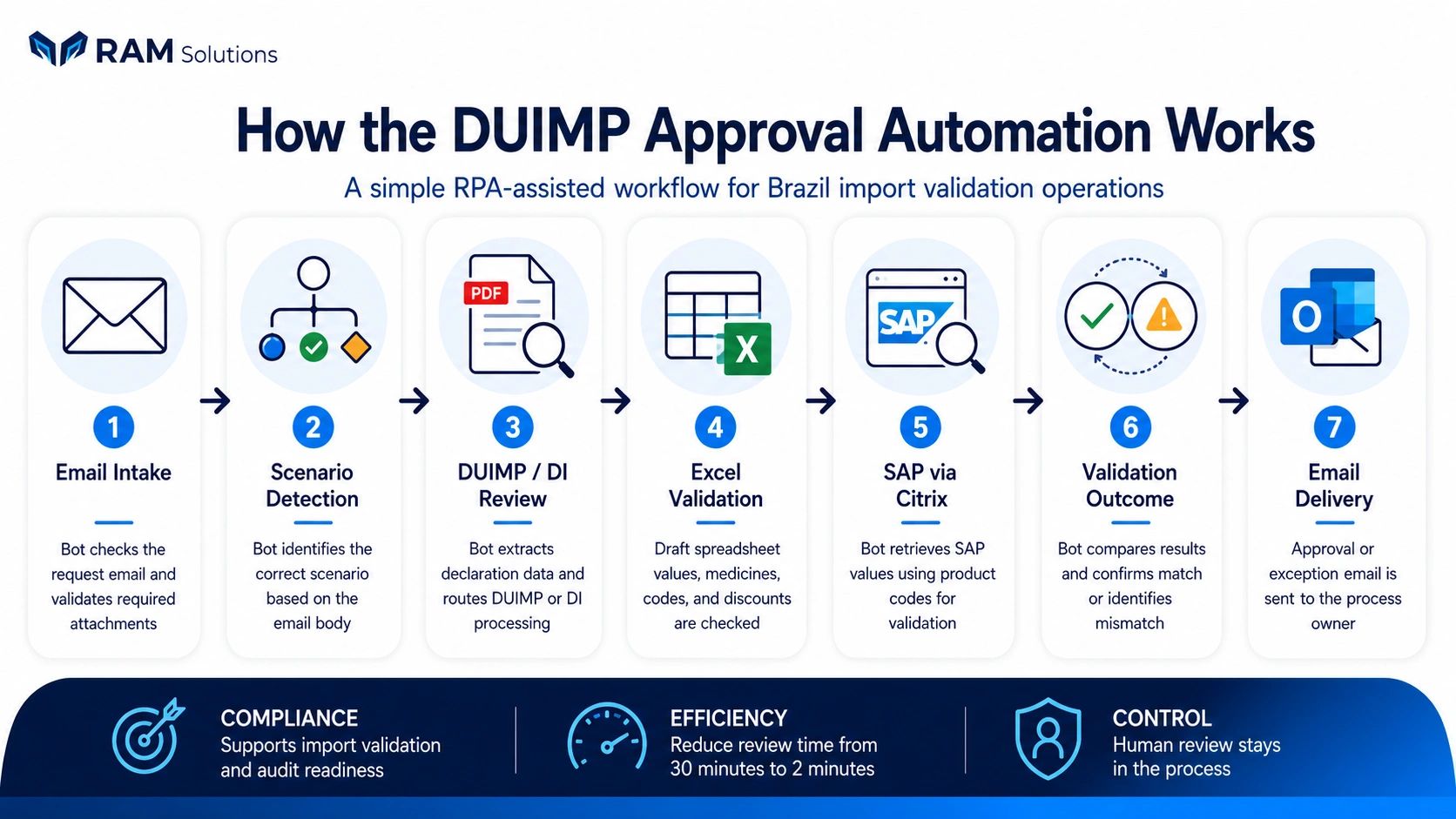
How the DUIMP Automation Works
The automation followed a structured workflow designed to reduce manual validation effort while preserving control and exception handling.
Email Intake → Attachment Validation → Scenario Detection → DI / DUIMP PDF Extraction → Spreadsheet Validation → SAP via Citrix Lookup → Approval or Exception Email
The bot can support:
- Incoming email review
- DUIMP and DI document validation
- Spreadsheet draft validation
- Scenario detection based on email content
- PDF data extraction
- Excel data extraction
- Product code-based SAP lookup
- SAP automation through Citrix
- OCR-assisted screen interaction
- Match and mismatch validation logic
- Approval email preparation and delivery
- Exception email notification for manual review
Results and Business Impact
The automation reduced a process that previously took approximately 30 minutes per document into an RPA-driven workflow that completed in approximately 2 minutes per document.
Approximately 30 minutes → Approximately 2 minutes per document
The solution helped reduce manual validation effort, improve consistency, and provide faster communication to the process owner when documents were ready for review or required correction.
Instead of manually moving between Outlook, PDF files, Excel spreadsheets, SAP through Citrix, and validation steps, the process owner received a structured result email with the appropriate files and comments.
Business Value for Pharmaceutical Supply Chain Teams
This automation helped support a sensitive pharmaceutical import validation process by making the workflow faster, more repeatable, and easier to control.
For pharmaceutical supply chain teams, this type of automation is valuable because import approval documentation can directly affect customs clearance, product movement, and downstream logistics execution.
Key Benefits
Key Benefits
Key Benefits
✓ Reduces manual DUIMP and DI validation effort
✓ Improves consistency across import approval checks
✓ Supports PDF, Excel, Outlook, and SAP validation workflows
✓ Uses OCR-assisted automation for SAP via Citrix
Key Benefits
Key Benefits
✓ Reduces time spent comparing product codes and values manually
✓ Sends clear approval or exception emails to the process owner
✓ Keeps human review in place for final decision-making
✓ Supports pharmaceutical supply chain and import compliance operations
Automate Document-Heavy Supply Chain Workflows
RAM Solutions helps businesses design and implement practical automation solutions using Power Automate Desktop, Outlook, Excel, PDF automation, SAP, Citrix, OCR, and other business systems.
Whether you need to reduce manual document validation, improve supply chain process consistency, or automate repetitive approval workflows, we can help identify the right opportunities and build a practical automation solution.
© 2026 RAM Solutions. PilotJoy by RAM Solutions. All rights reserved. Privacy Policy | Terms of Service | Blog